Master Strategy for International New Students
A step-by-step course selection guide covering essential academic policies, timelines, and registration systems.
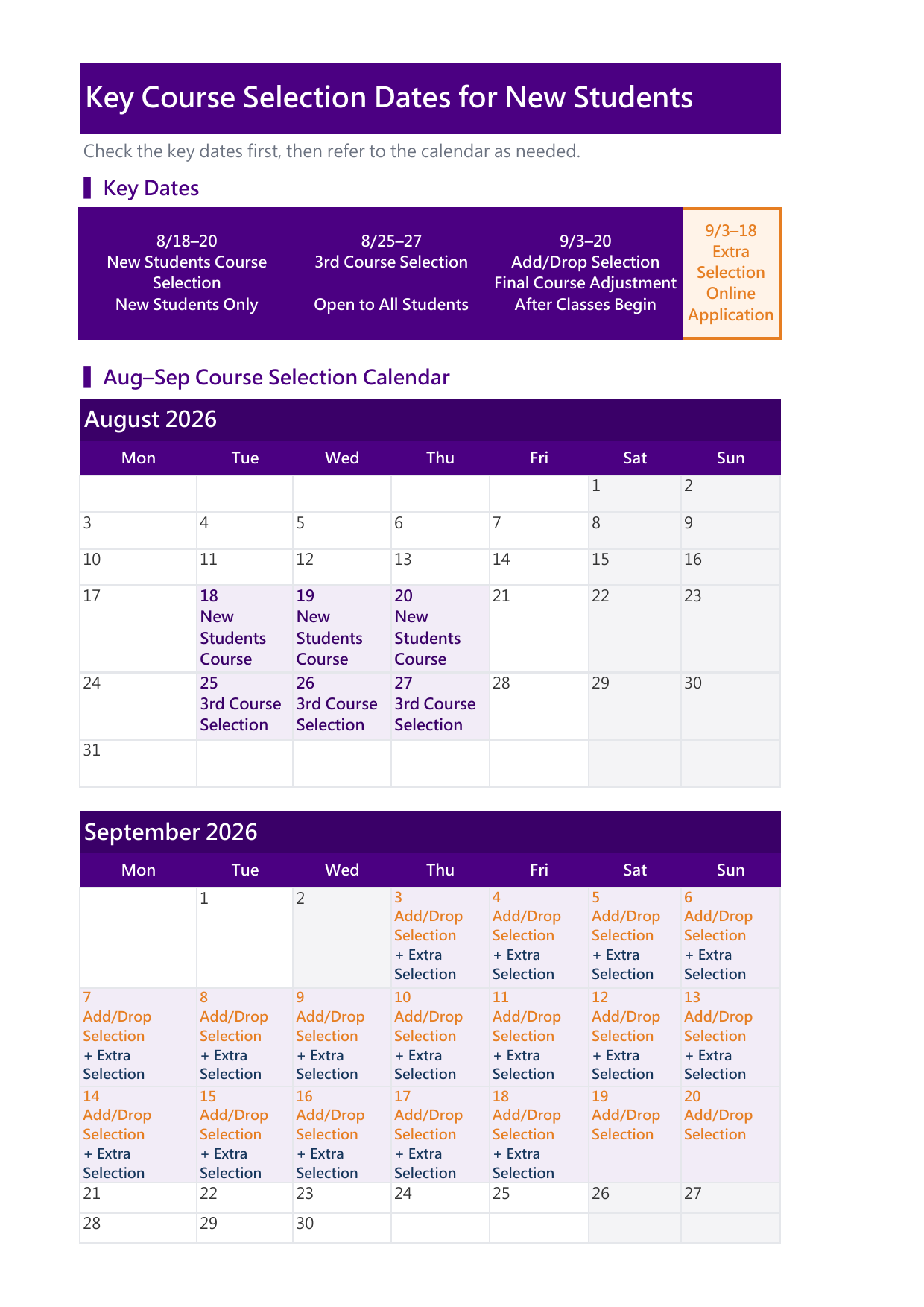
⏱️ Freshman Course Selection Schedule Overview
Freshmen Key DatesAug 18 (Tue) 12:00 PM
– Aug 21 (Fri) 09:00 AM
Aug 25 (Tue) 12:00 PM
– Aug 28 (Fri) 09:00 AM
Sep 03 (Thu) 12:00 PM
– Sep 21 (Mon) 09:00 AM
Sep 03 (Thu) 12:00 PM
– Sep 19 (Sat) 09:00 AM
📢 Before You Start: Essential Academic Policies
Core Steps: 8-Step Course Selection Guide
Follow these steps sequentially to navigate your course selection process smoothly:
Selection Schedule
📅 Check key dates for course registration, add/drop periods, and deadlines.
Requirements
📚 Understand mandatory courses, electives, and credit limits for graduation.
Course Search
🔎 Browse available courses, syllabi, English-taught (EMI) options, and schedules.
Pre-selection
📝 Draft your ideal schedule in advance to avoid time conflicts.
Official Selection
✅ Log into the Academic System to formally submit your course choices.
Check Results
🔍 Review assigned courses and lottery selection outcomes after each stage.
Extra Selection
💡 Learn how to request instructor permission during Add/Drop week.
Final Confirmation
🔄 Double-check your final course list online before the hard deadline.
Strategies & Practical Tools
⚠️ All Courses Require Manual Registration
Please Note: NTHU implements a self-directed course selection system. Regardless of whether a course is mandatory (required) or elective, NO courses are pre-registered or automatically added to your timetable by the university. You must manually register for every single class online within the designated periods.
⚠️ Critical Reminder: Enroll in Mandatory Courses in Their Appointed Semesters
The enrollment capacity for mandatory courses is strictly budgeted based on the headcount of freshmen in that specific academic year. Although returning students can select courses earlier (in June), NTHU implements a "Freshmen Quota Reservation" or "Freshmen Only restriction" on first-year mandatory classes to protect your rights.
If you fail to take a required course during its designated semester and delay it to future years, you are highly likely to encounter severe consequences: courses hitting their maximum capacity, scheduling conflicts with advanced required courses, or failure to enroll, which will directly delay your graduation timeline.
Digital Learning Systems Sync Schedule
Please note that newly added courses are synchronized to digital learning platforms according to the following fixed schedule:
📅 Add-or-Drop Period / Extra Selection
Updated Twice Daily: 08:00 AM & 07:00 PM
☀️ Summer Session
Updated Twice Daily: 08:00 AM & 07:00 PM
🛠️ Technical Support (Computer Center)
Email: eeclass@my.nthu.edu.tw
Email: elearn@my.nthu.edu.tw
Course Selection Overview & Roadmap
Visual guide to key dates and course selection workflow for international students.