
How to Check Course Quotas & Waiting List Numbers
🟢 During Course Registration Period
The system displays real-time "Remaining Seats" and "Total Waitlist Applicants," which are essential for assessing competition:
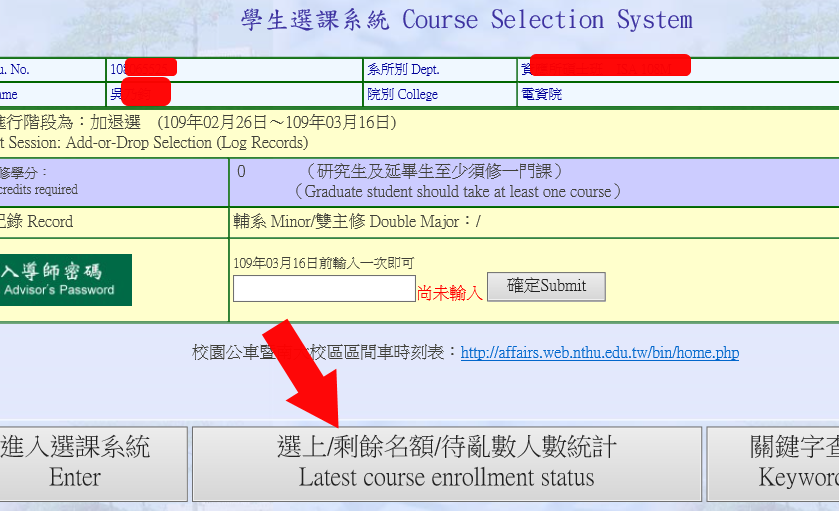
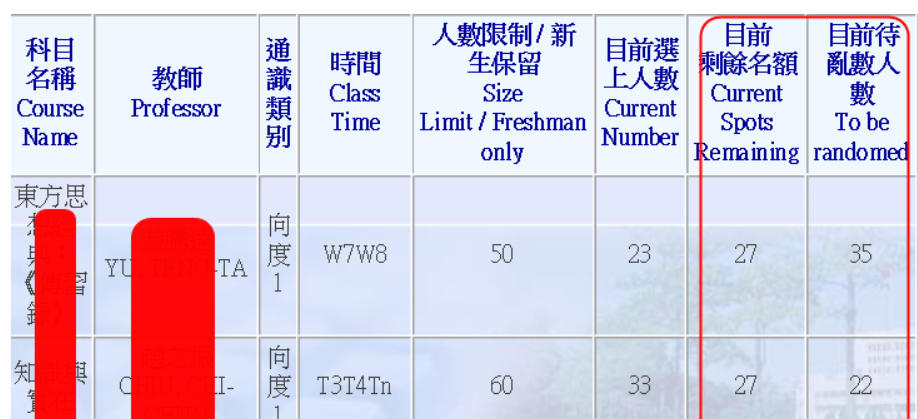
🔵 Outside Course Registration Period
To check course offerings and enrollment capacity outside the registration period, please use the Curriculum Section interface:
💡 How to read: If the system displays "Enrollment = Size Limit", it means the course is currently full.

🎯 Admission Chance Assessment (How to Interpret the Numbers)
-
Remaining Quota > 0 (Seats Available): You have a chance in the random selection process! However, during the course registration period, you must also consider the "Waitlist Number":
-
Waitlist Number < Remaining Quota: Guaranteed admission for everyone.
-
Waitlist Number > Remaining Quota: Random selection applies. A larger waitlist means higher competition and lower individual odds.
-
-
Remaining Quota = 0 (Currently Full): No immediate allocation chance. You must wait for other students to drop the course to free up seats for the next process.