
Guide to Course Preference Ranking & YZ Codes | NTHU
Course Priority Order Rules — Fill Up Your Preferences to Maximize Selection Success
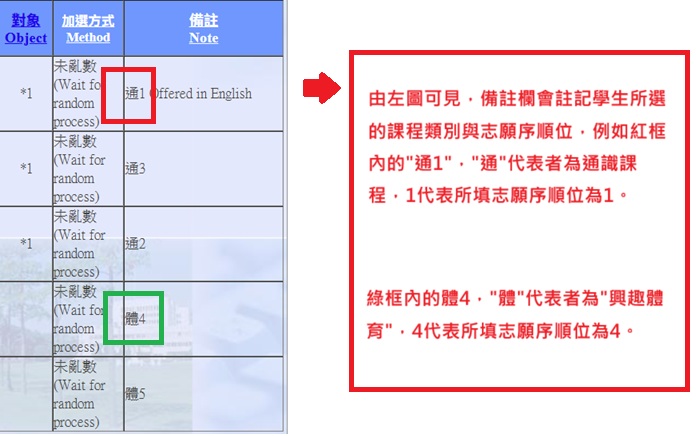
- During Phase 1 to Phase 3 course selection (including Freshmen & Transfer Students selection), students may rank multiple preferences according to their personal choice for Chinese, English, General Education (GE), Elective PE, and certain multi-section courses.
- The maximum number of allowed choices varies by course. The system will automatically display the maximum limit available for each subject.
- Place your most desired course as Preference #1 and rank the rest in order of preference. The more preferences you select, the higher your chances of being enrolled.
- Time Conflicts are Allowed in Preferences: You may rank preferences that have overlapping class times. Please feel confident in filling them out.
- General Courses (Most limit enrollment to 1 course): The system processes preferences via random lottery sequentially. Once you are enrolled in 1 course, remaining lower-ranked preferences will no longer be processed.
- General Education (GE) Courses (Up to 3 courses allowed): The system distributes courses based on your priority order. If a higher priority is granted, any subsequent lower priorities with time conflicts will be automatically skipped. Non-conflicting courses will remain eligible for distribution.
-
💡 Success Tip:
For courses allowing priority ordering, "please try to fill up all available preference slots." Filling out all preferences significantly expands system matching and increases your overall admission probability!
General Education & Elective PE Share the Same Priority List (Up to 20 Choices, No Duplication)
Key Guidelines:
- Fall Semester (Freshmen): Freshmen are restricted to Freshman PE and cannot select Elective PE. Therefore, all 20 preference slots can be used exclusively for GE courses.
- From Spring Semester Onward: GE and Elective PE share a single priority list of 20 choices. If Preference #1 is set to a GE course, PE cannot be placed as Preference #1 (slots are used sequentially).
- It is highly recommended to fill out all 20 choices to maximize your success rate.
| Priority | Category | Course Title |
|---|---|---|
| 1 | GE | Psychology of Love |
| 2 | PE | Weight Training |
| 3 | GE | General Psychology |
| 4 | PE | Yoga |
| … | … | … |
| 20 | GE | Science Fiction Literature |
Course Selection Guide for "YZ" Prefix Codes (Virtual Course Codes)
Concept Explained
Why do course codes starting with "YZ" appear in the curriculum?
When a required course offers multiple sections for students to choose from (such as Calculus, General Physics, English, PE, etc.), the Curriculum Office places a "Virtual Representative Code (starting with YZ)" in department required/elective course lists.
⚠️ When clicking "Add" on a YZ code in the system:
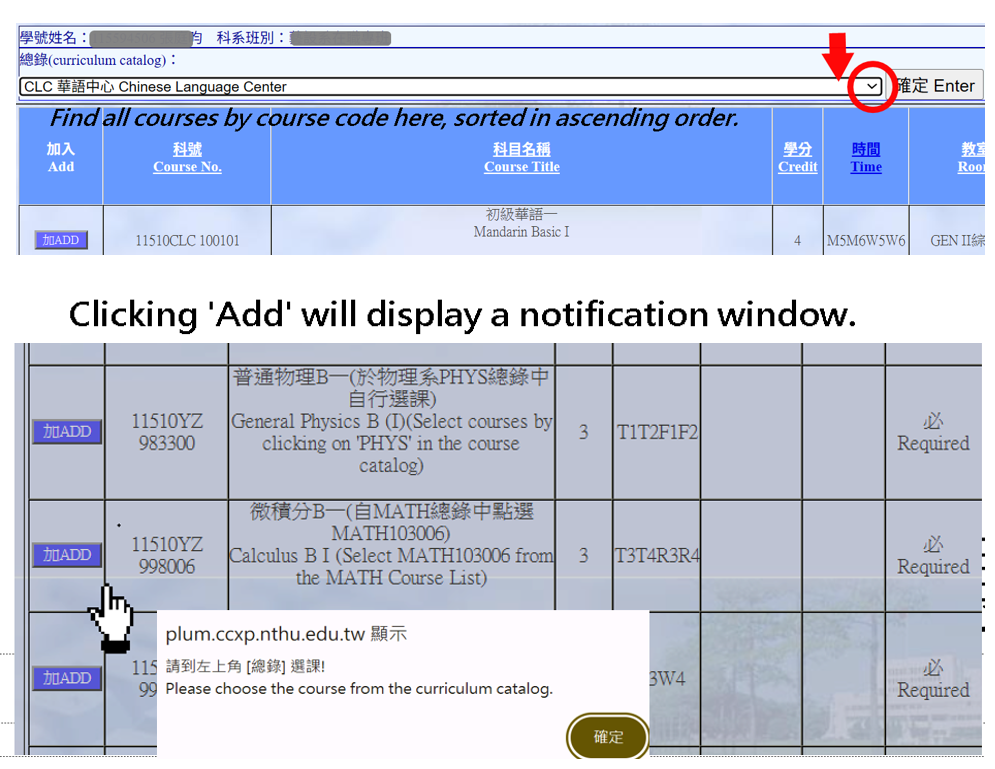
A pop-up message will appear, e.g., "Please choose the course from the curriculum catalog. This indicates that you cannot add the course directly; you must select your preferred section by ranking priorities!
A pop-up message will appear, e.g., "Please choose the course from the curriculum catalog. This indicates that you cannot add the course directly; you must select your preferred section by ranking priorities!
💡 3 Steps to Select YZ Prefix Courses:
- Note the Course Offering Unit: Check the pop-up message to identify which Course Catalog offers the class (e.g., Department of Mathematics, Center for Language Education, Physical Education Office, etc.).
- Switch to the Specified Catalog: Use the drop-down menu at the top of the Course Selection System to switch to the corresponding catalog (e.g., select "Department of Mathematics Catalog").
- Rank and Submit Preferences: Select your preferred instructors and time slots from the catalog, order them by preference, and click save to submit.
Click Num: