
Add/Drop Course Selection
Final Stage of Online Course Selection
The Add/Drop Period is the final stage to adjust your schedule, which typically takes place during the first two weeks of the semester.
System Schedule During Add/Drop Period
| Date | Open | Maintenance |
|---|---|---|
| Daily | 12:00 PM ➜ Next Day 09:00 AM | 09:00 AM ➜ 12:00 PM |
|
System Opens: Sep 03, 2026, 12:00 PM System Closes: Sep 21, 2026, 09:00 AM |
||
Daily Random Assignment
Randomization Process
The course registration system performs a randomization process for subjects with limited seats every day at 9:00 AM during the Add-or-Drop period.
In the afternoon, you can check the results online. If a course is full and someone drops it, seats may become available.
To learn how to view the "Latest Course Enrollment Status," click this link.
Tip: Check course enrollment online daily. Alternatively, ask the instructor for permission to enroll through the extra selection process.
How to Verify Your Course Selection
Access the Academic Information System, choose "Select Courses", then "Inquiries Regarding Course Selection Results".
Select the course selection phase: "Add/Drop Selection (Log Records & Random Result)" from the drop-down menu.
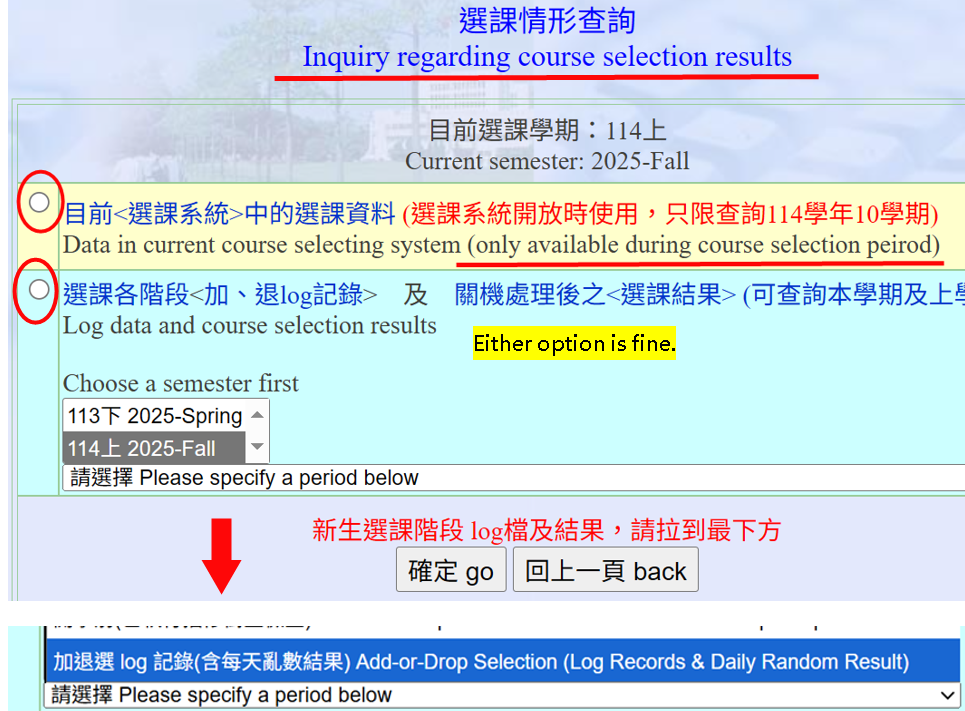
Understanding the Logs
The upper panel shows the "Course Selection Status" with all verified selections.
The "Course Selection Add/Drop Log Records" section shows detailed logs and randomization results.
Last-Minute Selection
Students may choose restricted courses until the last minute on the final day of Add-or-Drop.
The randomization results will only be available after noon, so course status cannot be changed until then.
End of Add/Drop Period
The course selection process concludes at the end of the Add/Drop Course Selection period. Before this deadline, you must review your course choices carefully to ensure accuracy, and you may still modify, add, or drop courses. Any courses dropped on or before this date will be removed from your academic record. After the deadline, the system records maintained by the Computer and Communication Center are final, and students are responsible for their own selections without exception.
Pop-up Messages During Course Selection
Learning Platforms & Student Status Data Synchronization Schedule
1. eLearn / eeClass E-Learning Platforms
During the course add/drop period, the Academic Information System and the e-learning platforms are not synchronized in real time. The course enrollment list is automatically updated twice daily:
| Batch | Platform Update Time |
|---|---|
| 1st Batch | 08:00 AM |
| 2nd Batch | 07:00 PM |
For a complete list of synchronization schedules, please refer to the [Detailed Announcement on System & Platform Synchronization].
2. Graduation Audit & Grade Inquiry Systems
- During the course selection period, your personal academic status in the Undergraduate Graduation Audit System and Grade Inquiry System will not update in real time. Updates will only occur after the Add/Drop Selection Period has completely ended and data validation checks are finished.