
How to Check Live Enrollment Status & Vacancies
Enrollment Guide for Capacity-Limited Courses: Random Allocation & Success Tips
(Not a first-come, first-served system)
Course Selection Fairness Mechanism
All selection phases and add/drop periods use a random allocation process. Enrollment is NOT based on the time of registration.
⚠️ Important Reminder:
All seats are allocated randomly. Regardless of when you register during a phase, the probability of enrollment is calculated independently for each round.
All seats are allocated randomly. Regardless of when you register during a phase, the probability of enrollment is calculated independently for each round.
🎲 Random Allocation: System-automated fair processing.
📊 Live Capacity: Track available seats and applicant dynamics.
🔄 Fresh Starts: Each processing window is an independent event.
📌 Interpreting Selection Status
After registering for a course with capacity limits, it will appear in your temporary list with the status:
Waiting for random process
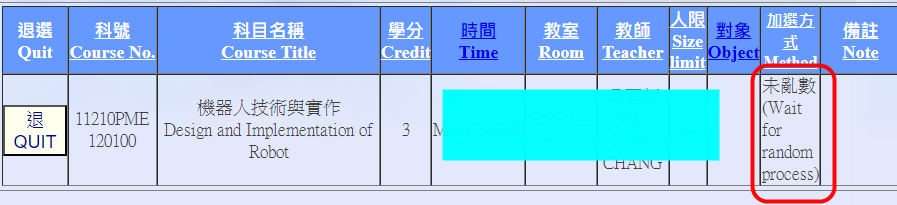
💡 Note: Please wait for the random allocation process to be conducted after the selection phase ends to see if you have successfully enrolled.
⏰ Random Allocation Timing
1st – 3rd Selection Phases
Processed once after the phase ends.
Processed once after the phase ends.
Add/Drop Period
Processed daily at scheduled times (09:00-12:00).
Processed daily at scheduled times (09:00-12:00).
📊 Checking Vacancies & Waiting Lists
🟢 During Selection Periods (Real-time)
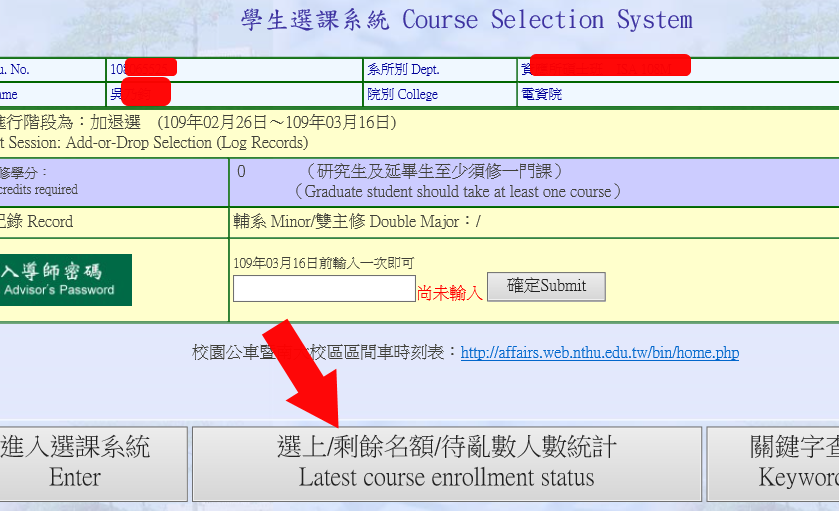
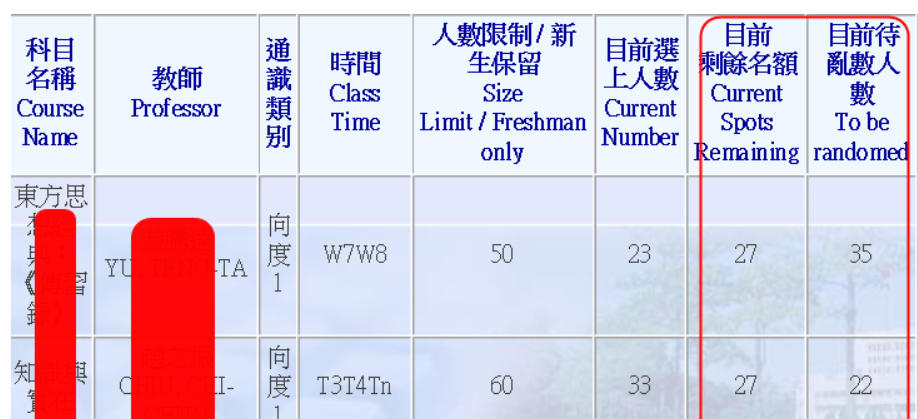
Academic Information System → Select Courses → Report → Latest Course Enrollment Status
The system displays "Current Vacancies" and "Total Applicants waiting for random process." Use this data to assess the competition level.
🔵 Outside Selection Periods
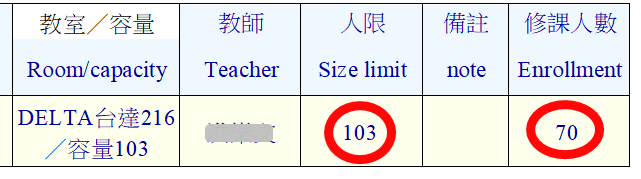
Curriculum Division Website → Course Catalog / Keyword Search
You can use various interfaces within the course inquiry to obtain information about the remaining quotas for courses. If "Limit = Enrolled," the course is currently full.
🎯 Preference Ranking Strategy
Applicable CoursesUniversity Required Courses (Chinese/English), General Education, PE (Interest-based), Core Requirements (Calculus/Physics, etc.)
💡 Increase Your Success Rate:
For subjects that allow multiple preferences, ensure you fill in all available choice slots. Providing more choices expands the matching scope and increases your chance of being allocated a seat.
For subjects that allow multiple preferences, ensure you fill in all available choice slots. Providing more choices expands the matching scope and increases your chance of being allocated a seat.
📈 How to Assess Your Chances?
- Vacancies > 0: Available seats are still up for allocation.
- Vacancies = 0: You must wait for other students to drop the course to create a vacancy for the next round.
- Higher Applicant Count: Indicates higher competition.
⚠️ Core Logic:
Each random allocation round is an "Independent Event." Regardless of previous results, as long as a seat becomes available, all students registered for that course have an equal chance of being selected in the next round.
Each random allocation round is an "Independent Event." Regardless of previous results, as long as a seat becomes available, all students registered for that course have an equal chance of being selected in the next round.
Click Num: