
Summer Course Enrollment Guide
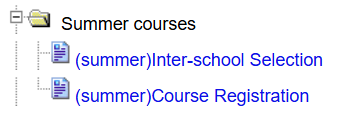
Log in to the 【Academic Information System】, then select <Summer courses> and click on <Course Registration> from the menu.
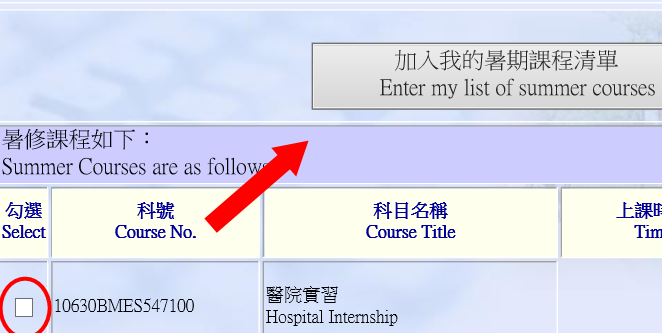
From the course list, check the boxes for the summer courses you wish to take. After confirming they are correct, add them to your course selection list.

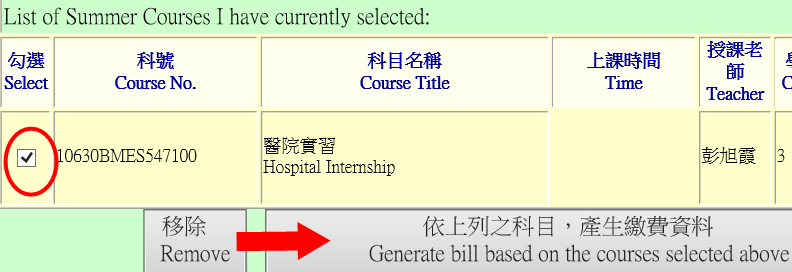
After confirming that all courses have been added, click the function button to generate the summer course selection payment slip.
Print out the complete "Summer Course Selection Payment Slip" and proceed with the signature process according to the course restrictions:
🔴 Courses with enrollment limits: 【Must be signed and approved by the instructor】 before payment can be made.
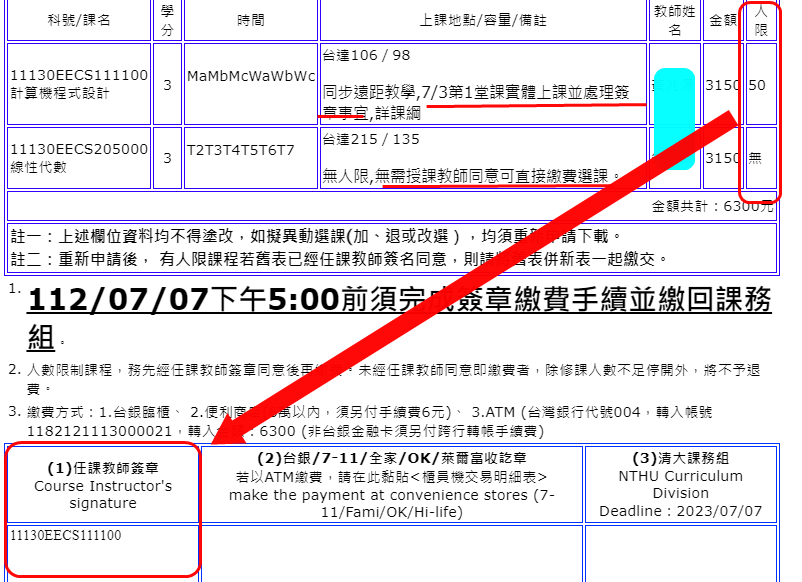
Make the summer course tuition payment through the designated channels using the payment slip, and properly keep the relevant payment receipt or a screenshot of the transaction details.
Submit the completed "Summer Course Selection Payment Slip" along with the proof of payment to the 【Division of Curriculum】 for processing before the deadline to complete all summer course procedures.