
Instructions for Course Evaluation
⏰ Evaluation Period: Please refer to the Academic Calendar.
Where to complete the evaluation?
Please log in to the Academic Information Systems and follow the steps below:
🔍 Step-by-Step Guide
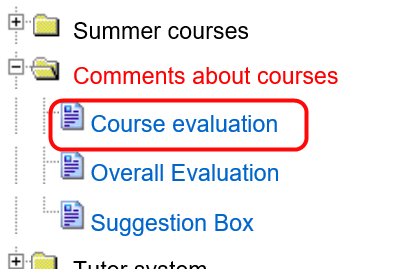
- Click the folder icon named "Comments about courses".
- Select "Course Evaluation" from the menu.
Step 1 & 2. Select Menu
Step 3. Choose Course

Step 4. Fill Out Questionnaire

Step 5. View Confirmation

Instructions for Non-NTHU Students
(Including exchange students and public/extension education students)
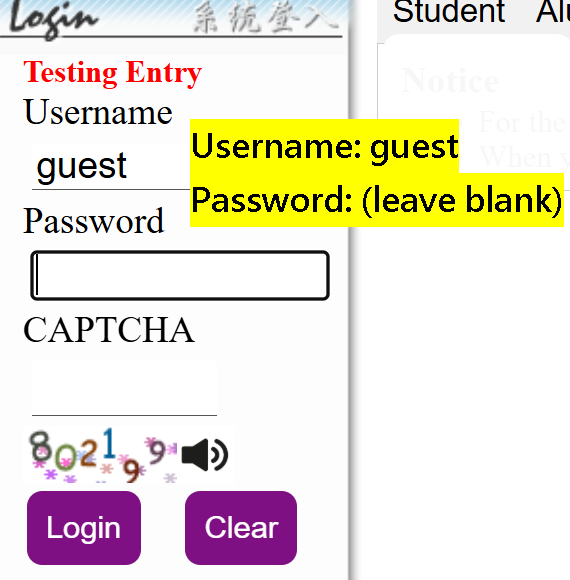
Please use the designated visitor account details below to log in to the system.
🔑 Visitor Credentials:
Username: guest
Password: (Leave blank)
Password: (Leave blank)
Please go to Academic Information Systems and follow the path shown below:
🔍 Step-by-Step Guide for Non-NTHU Students
Step 1. Login as 'guest'
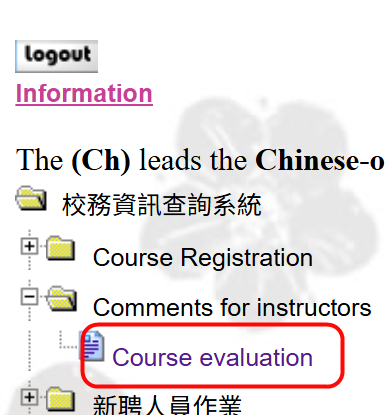
Step 2. Select System Menu
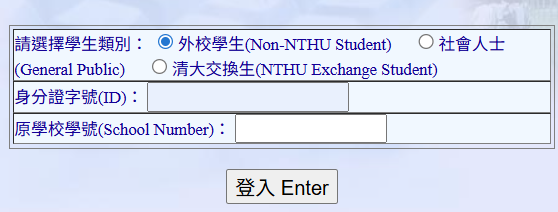
Step 3. Follow the questionnaire path below to complete
⚠️ Critical Rules (Applicable to All Students)
📌 Important Submission Reminder
✅ Double-Check: After completing the questionnaire, a confirmation window will pop up. Please thoroughly review if the course details match.
⚠️ Irreversible Action: Once your evaluation is submitted, it CANNOT be edited, modified, or resubmitted under any circumstances. Please make sure all information is precise before clicking submit.
✅ Double-Check: After completing the questionnaire, a confirmation window will pop up. Please thoroughly review if the course details match.
⚠️ Irreversible Action: Once your evaluation is submitted, it CANNOT be edited, modified, or resubmitted under any circumstances. Please make sure all information is precise before clicking submit.
🔒 Two-Step Submission Safeguard Mechanism:
To effectively prevent accidental or incorrect submissions, the school has implemented a mandatory double-layer protection:
① First Layer — “Confirm and Submit” Button
Upon clicking submit, the system will immediately prompt an alert message stating: “It CANNOT be modified after submission,” giving you a final chance to review.
② Second Layer — Final Confirmation Popup Window
A final system dialogue window will appear. Students must carefully cross-check the following fields:
- Course Number & Course Title
- Instructor’s Name
Click Num: