
Course Load Regulations & Credit Exceptions
I. Credit Limits Per Semester
Student loads must meet the following criteria by the end of the Add/Drop period:
🎓 Undergraduate
- Freshmen to Juniors: 16–25 credits
- Seniors: 9–25 credits
- Extended-term students: At least one course (including PE courses)
🔬 Graduate / Exchange
- Graduate: At least one course (incl. Thesis)
- Exchange: No minimum limit required by NTHU
II. Credit Overload (Over 25 Credits)
Starting from the 1st Selection Period, if an undergraduate student's total credits exceed 25, the system will trigger a "Credit Limit Reached" warning. Students must choose one of the following two options:
1. Manual Adjustment
Drop courses manually before the Add/Drop deadline to stay within the 25-credit limit.
Drop courses manually before the Add/Drop deadline to stay within the 25-credit limit.
2. Overload Application
Apply through your department office and ensure the "Approved" status is set in the system before the deadline.
Apply through your department office and ensure the "Approved" status is set in the system before the deadline.
⚠️ Important Notice: For those without an approved overload status, the system will randomly drop excess courses after the Add/Drop period until the credit limit is met.
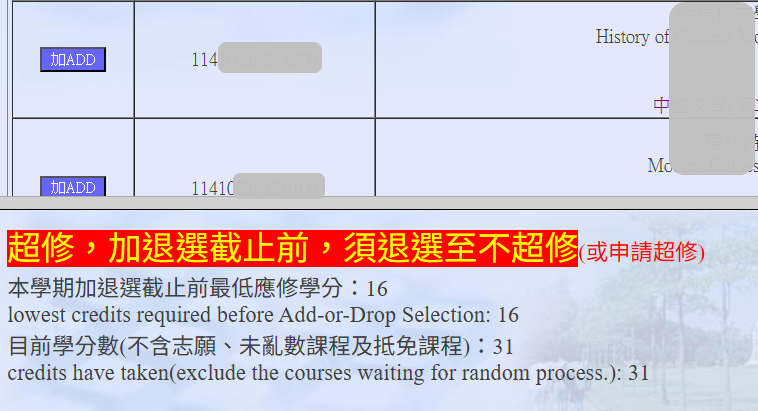
📌 Application Process
🕒 Period: From 1st Enrollment Period to the Add/Drop Deadline
Download the Credit Overload Form.
Obtain signatures from your Mentor (Advisor) and Department Chair, then submit it to your Department Office.
Check the "Approved" note in the Course Selection System once the office completes the setup.
III. Credit Underload (Below Minimum)
📢 System Alert: If credits are below the limit, the system will display a "Total credits below minimum requirement" warning.
Warning: According to NTHU Academic Regulations, students who fail to meet the minimum credit requirement by the deadline may be subject to compulsory withdrawal from the university.
Warning: According to NTHU Academic Regulations, students who fail to meet the minimum credit requirement by the deadline may be subject to compulsory withdrawal from the university.
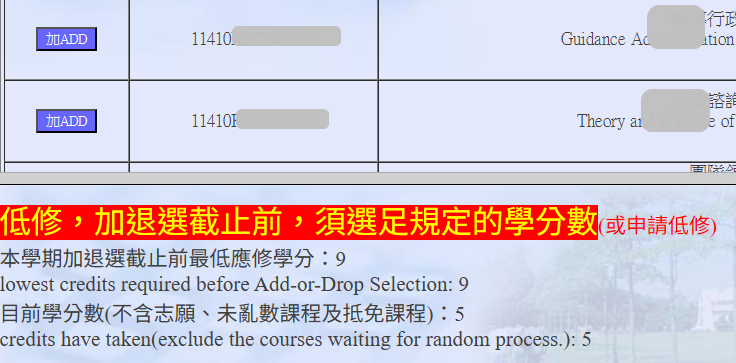
If your total credits fall below the minimum requirement, you must choose one of the following two options:
1. Manual Adjustment (Add Courses)
Add courses manually before the Add/Drop deadline to reach the required minimum credit limit.
Add courses manually before the Add/Drop deadline to reach the required minimum credit limit.
2. Underload Application
If you cannot meet the minimum credits due to special circumstances (or after Mid-term Withdrawal), submit an application for approval before the deadline.
If you cannot meet the minimum credits due to special circumstances (or after Mid-term Withdrawal), submit an application for approval before the deadline.
📌 Application Timelines
Phase 1: Add/Drop Period
1st Enrollment ~ Add/Drop Deadline
1st Enrollment ~ Add/Drop Deadline
Phase 2: Mid-term Withdrawal Period
Withdrawal Start ~ Deadline
Withdrawal Start ~ Deadline
📌 Application Process
Download the Credit Underload Form.
Obtain signatures (Mentor & Chair) and submit to your Department Office.
Verify the "Approved for Underload" note in the Academic Information System.
✅ How to Verify Your Application?
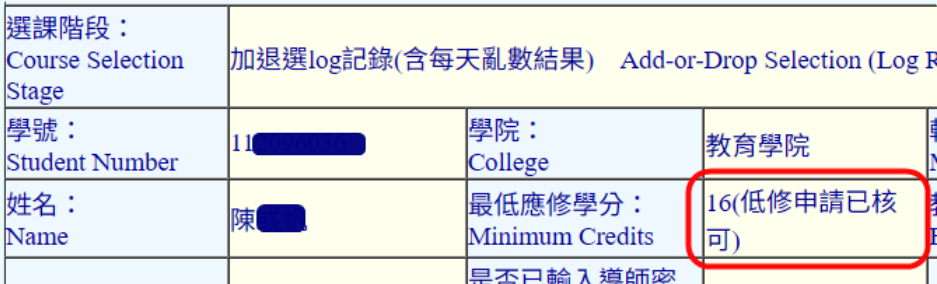
After the department setup, please log in to verify. Red text annotations in your course list indicate a successful application:
Overload Approval:
Check "Course Selection System" or "Course Selection Results" for the note:
"Approved: overload credit"
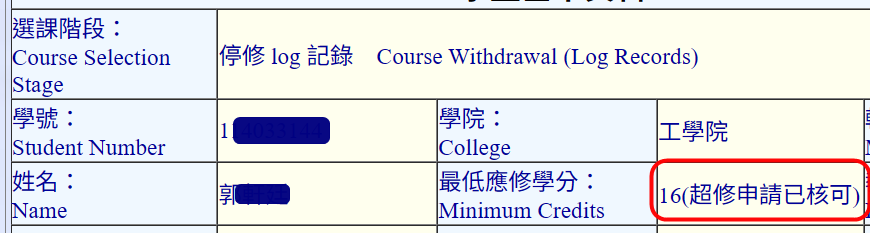
Underload Approval:
Check for the note:
「低修申請已核可」(Approved: underload credit)
Click Num: