Teacher enquiry course evaluation results
Open enquiry period
After 10 days from the deadline for teachers to submit grades according to the school calendar, teachers are allowed to access the school information system to inquire about the evaluation results (including the statistical results of the teaching opinion surveys for individual subjects over the years and the text suggestions submitted by students). When the enquiry function is opened, the Division of Curriculum will also send an email notification to all faculty members.
Access to teaching evaluation results will only be available after all grades for the semester have been submitted to the Registration Division. If the grades have not yet been submitted, or if the submission is incomplete, faculty members will temporarily be unable to view the results. The system will open once all grades have been received by the Registration Division.
Access the "Academic Information System" and click on "<Evaluation Results>" under the Course Evaluation section.
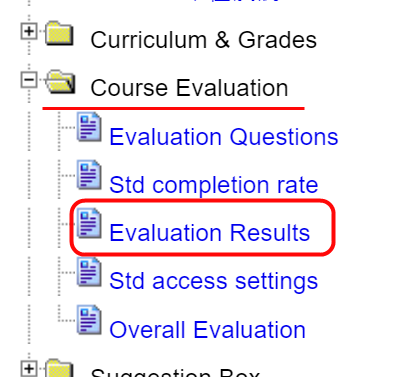
Faculty members may access both the evaluation results and the written feedback provided by students, each available for separate viewing.

Disclosure of Overall Evaluation Results
Starting from Fall Semester 2016, students may have access to a part of the results (i.e. "Overall Evaluation: The instructor's performance is outstanding.") if the instructor decides to make them public.
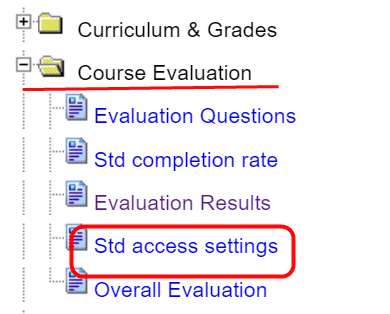
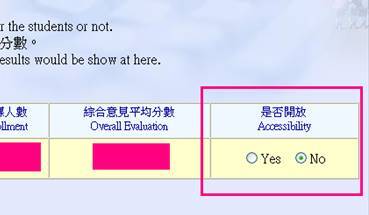
Please decide whether the above mentioned part of the evaluation results shall be accessible for the students or not. The default value for each course is 「No」. Once you have chosen 「Yes」, students will be able to view the result as soon as announced.
Additional Explanation
1. Survey Timing and Enrollment Numbers
Course evaluations are conducted after the withdrawal period. The “number of students enrolled” reflects the enrollment at the start of the survey. The final enrollment may differ due to factors such as student leave of absence or withdrawal at the end of the semester.
2. Student Self-Assessment Grouping
For student self-assessments:
-
Students who indicate “very seriously” or “somewhat seriously” under behaviour in class, and report attendance as “perfect attendance,” “1–3 times,” or “4–5 times”, are classified as Group A.
-
All other responses are classified as Group B.
3. Access for Retired or Former Faculty
Full-time faculty members after retirement, as well as part-time faculty members who have left the university, may still log in to the Academic Information System to view their teaching evaluation results.
-
Login ID: Faculty staff number
-
Password: The password previously set by the faculty member
If the staff number is forgotten, please contact the Personnel Office.
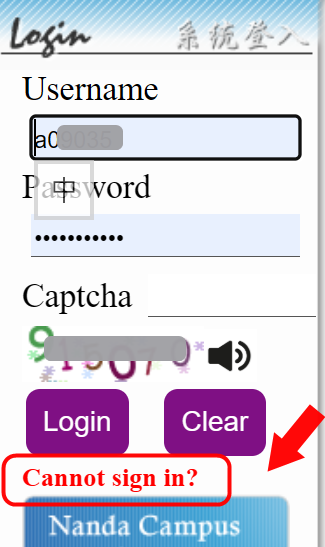
If the password is forgotten, click “Unable to log in” and follow the on-screen instructions provided by the Computer and Communication Center to reset it.