
Authorization Guide for Class Roster & Attendance List (AIS Teacher Authorization Function)
This page provides instructions only for the “Class Roster and Attendance List” authorization feature. The AIS Teacher Authorization Function is developed by the Computer and Information Center. For any operational issues, please contact the Computer and Information Center.
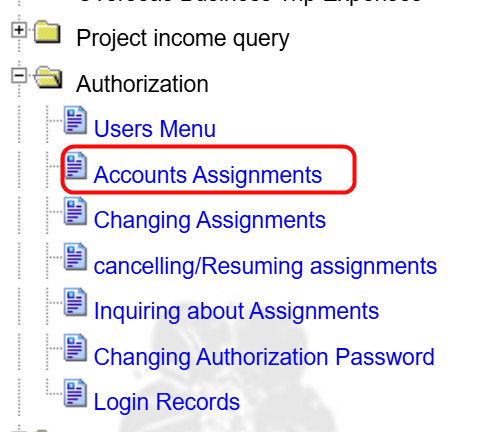
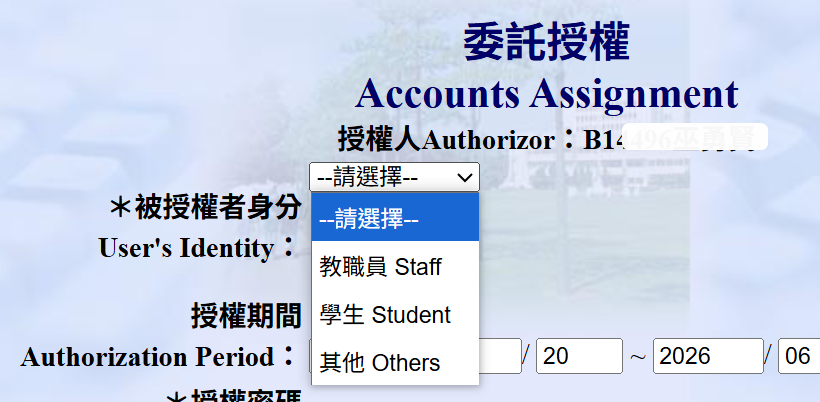
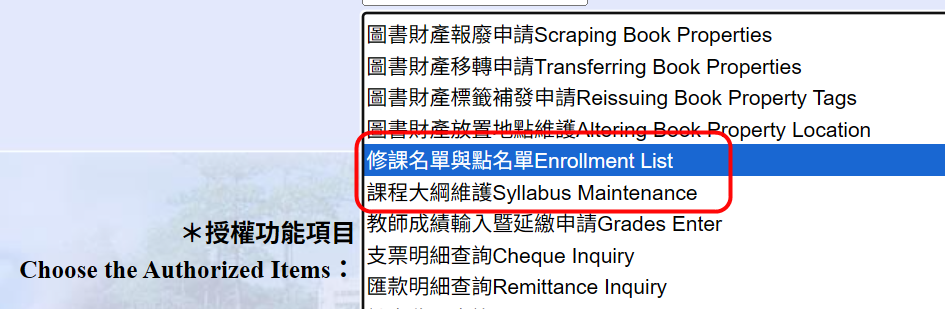
1. Authorization Function
- Instructors can authorize specific functions (such as viewing or printing enrollment lists) in the Academic Info System to others (e.g., TAs) within a designated time period.
2. Authorization Process
- The system will generate an "authorization account," and the instructor will set an "authorization password."
- Instructors must record both the account and password and provide them to the authorized person for login.
 |

3. Actions by the Authorized Person
-
The authorized person may use the designated functions during the authorization period. Their actions will carry the same validity as those performed by the instructor. 。
4. Authorization Account and Password
- The authorization account is automatically generated by the system, while the password is set by the instructor.
- Keep a record of both the account and password and provide them to the authorized person.。

5. Usage by the Authorized Person
- The authorized person may log in to the system using the account and password and perform the authorized functions.。

6. Forgotten Authorization Account
- In case the instructor forgets the authorization account, it can be retrieved through the system, as shown below.。

瀏覽數: