
query the results
Once the course selection ends, the system will begin random assignments. After announcing the results of the random assignments, students can log in to the ” Students' Inquiry System” to query the results of the selection. The checking screen is divided into Registration Succeeded and Registration Failed. The Registration Failed screen will list the reasons for the failure of selection (for example, enrollment quota exceeded). If the reason for such failure is "Time conflicts", students must arrange their schedule to erase conflicts when the selection system is available. The arrangement must be done no later than the add-or-drop selection period.
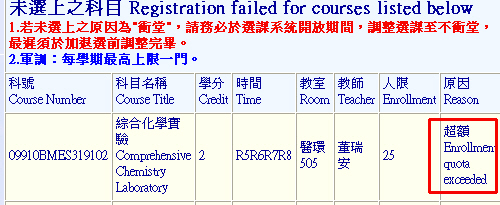 |
Since scores haven't been sent during the course selection at the end of the semester, and there might be changes for the time of courses. The Division of Curriculum will perform checks on conflicts and refusal of selection; therefore, students must ensure their results of selection before the 3rd selection begins. It is advised to eliminate schedule conflicts no later than the add-or-drop selection begins.
瀏覽數: